


The rise of AI video generation platforms has changed how businesses, marketers, educators, creators, and production teams create video content.
What once required cameras, actors, editing suites, locations, voiceover talent, and long production timelines can now often begin with a prompt, script, image, article, product description, or brand concept.
AI video generation does not replace every form of professional video production. AI animation has also rapidly grown and the AI platforms animators use are also expanding.
But it does create new ways to produce social clips, explainer videos, concept visuals, product scenes, training videos, pitch visuals, marketing assets, and experimental creative campaigns faster than before.
For businesses, this matters because video is no longer optional.
Websites need video.
Social media needs video.
Ads need video.
Sales teams need video.
Training teams need video.
Product teams need video.
And AI now gives businesses more ways to test, create, edit, and scale video content without starting every project from zero.
This guide reviews 7 of the best AI video generation platforms available today, including Google Veo, Pictory, Synthesia, Runway, Kling, HailuoAI, and Midjourney, with DeepBrain included as a bonus option for AI avatar and business video workflows.
AI Video Generation Tools and Platforms
The best AI video generation platform depends on the type of video you want to create.
For cinematic AI video generation, Google Veo is one of the most important platforms to watch.
For turning articles, scripts, and marketing content into videos, Pictory is a strong business-friendly option.
For avatar-based training, internal communication, and corporate videos, Synthesia is one of the strongest platforms.
For creative professionals who want more control, Runway is a leading choice.
For realistic generative video clips, Kling and HailuoAI are useful platforms to explore.
For artists who already use image generation and want image-to-video animation, Midjourney is now part of the AI video conversation.
For avatar videos, explainer content, and AI presenter workflows, DeepBrain AI Studios is a useful bonus platform.
AI Video Generation Platform Comparison
Before choosing a platform, it helps to compare them by use case.
Some tools are better for cinematic scenes.
Some are better for marketing videos.
Some are better for training.
Some are better for social media.
Some are better for quick content repurposing.
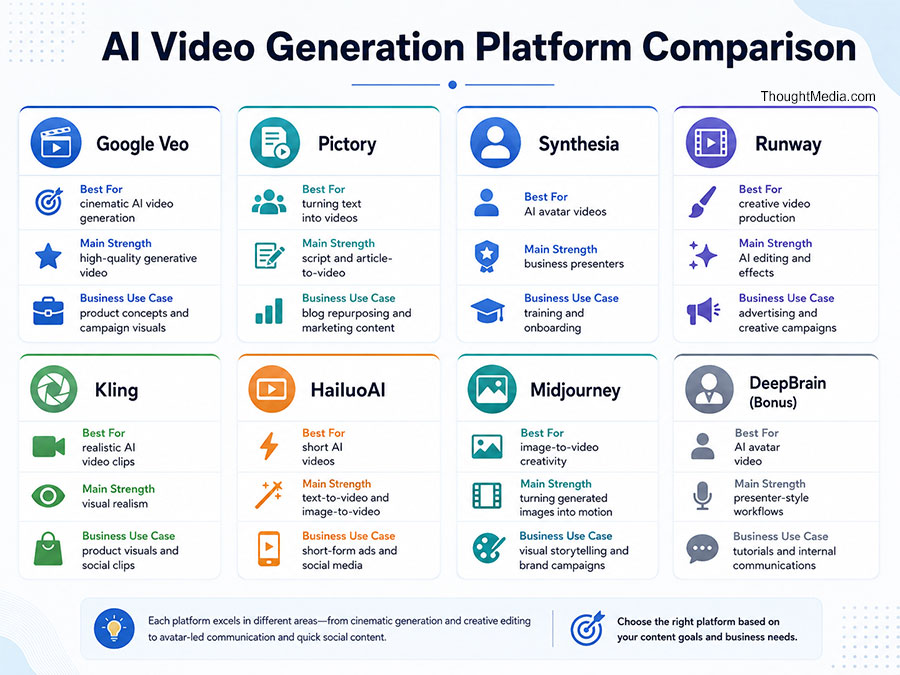
| Platform | Best For | Main Strength | Best Business Use Case |
|---|---|---|---|
| Google Veo | Cinematic AI video generation | High-quality generative video and creative control | Product concepts, campaign visuals, cinematic brand ideas |
| Pictory | Turning text into videos | Script, article, and URL-to-video workflows | Blog repurposing, social videos, marketing content |
| Synthesia | AI avatar videos | Business presenters and multilingual video | Training, onboarding, sales enablement |
| Runway | Creative video production | AI video, editing, effects, and image tools | Advertising, concept development, creative campaigns |
| Kling | Realistic AI video clips | Strong visual realism and motion generation | Product visuals, entertainment concepts, social clips |
| HailuoAI | Short AI-generated videos | Text-to-video and image-to-video workflows | Short-form ads, social media, creative tests |
| Midjourney | Image-to-video creativity | Turning generated images into motion | Visual storytelling, mood videos, art-led campaigns |
| DeepBrain AI Studios | Bonus: AI avatar video | Avatar presenters and business video tools | Explainers, tutorials, internal communications |
Best AI Video Platform By Business Goal
The best AI video generation platform is not always the most advanced one.
It is the one that fits the job.
| Business Goal | Best Platform Fit | Why |
|---|---|---|
| Create cinematic AI scenes | Google Veo, Runway, Kling | Stronger creative control and visual generation |
| Repurpose blogs into videos | Pictory | Built for turning text, scripts, URLs, and articles into video content |
| Build training videos | Synthesia, DeepBrain | AI avatars and presenter-style workflows work well for learning content |
| Create social media clips | Pictory, HailuoAI, Kling, Midjourney | Good for short, fast, visual content |
| Develop ad concepts | Google Veo, Runway, Kling | Strong for product visuals, campaign mockups, and creative testing |
| Create multilingual business videos | Synthesia, DeepBrain | Better suited for avatar presenters and business communication |
| Produce artistic visual storytelling | Midjourney, Runway, Google Veo | Better for concept art, mood, brand visuals, and creative direction |
| Build professional campaign content | Thought Media + AI tools | Strategy, scripting, editing, branding, production, and distribution still matter |
AI Video Platform Fit Chart
| Platform | Ease Of Use | Creative Control | Business Utility | Best Overall Fit |
|---|---|---|---|---|
| Google Veo | 8/10 | 10/10 | 9/10 | High-end AI video generation |
| Pictory | 9/10 | 7/10 | 9/10 | Marketing and content repurposing |
| Synthesia | 9/10 | 7/10 | 10/10 | Business and training videos |
| Runway | 7/10 | 10/10 | 8/10 | Creative production workflows |
| Kling | 7/10 | 9/10 | 8/10 | Realistic generative clips |
| HailuoAI | 8/10 | 8/10 | 7/10 | Short-form creative generation |
| Midjourney | 8/10 | 9/10 | 7/10 | Image-led video creativity |
| DeepBrain | 8/10 | 7/10 | 8/10 | Bonus avatar video workflow |
The Top 7 AI Video Generation Platforms Ranked
Let’s dive into the top 7 AI Video Generation platforms ranked from first to last, along with reasons why we have selected them as top AI video generating performers.
1. Google Veo
Google Veo is one of the most important AI video generation platforms for businesses and creators to watch.
Developed by Google DeepMind, Veo is designed for advanced video generation, creative control, and high-quality AI-generated video output.
For businesses, Google Veo is especially interesting because it sits inside the broader Google AI ecosystem. That matters because AI video generation is moving quickly from experimental creative tool to practical business asset.
Veo can be useful for:
- Brand concept videos
- Product scene generation
- Campaign visuals
- Social media creative
- Mood films
- Storyboard development
- Advertising concepts
- Pitch visuals
- Product launch ideas
- Early-stage video previsualization
The main advantage of Google Veo is its potential for high-quality, cinematic video generation.
It is not just a tool for turning text into basic slideshow-style videos.
It is better understood as an advanced generative video model that can help create scenes, motion, visual ideas, and creative concepts.
Why Google Veo Is #1
Google Veo earns the #1 spot because it represents where AI video generation is heading.
Businesses are no longer only looking for simple videos with stock footage and captions.
They want AI tools that can help create original visual concepts.
They want product videos without always filming.
They want campaign ideas before committing to full production.
They want visual storytelling at the speed of strategy.
Veo fits that direction.
Best Use Cases For Google Veo
| Use Case | Why It Fits |
|---|---|
| Product concept videos | Helps visualize products, environments, and use cases |
| Brand campaign visuals | Useful for early creative direction and mood development |
| Social media video concepts | Can help generate attention-grabbing visual scenes |
| Storyboarding | Supports idea development before full production |
| Pitch decks and presentations | Helps make concepts easier to understand visually |
| Creative testing | Allows teams to test different visual directions quickly |
Best For
Google Veo is best for companies, agencies, creators, and marketing teams that want cinematic AI-generated video and advanced visual concepting.
It is especially useful when the goal is to create something original rather than only repurpose existing written content.
2. Pictory
Pictory is one of the most practical AI video generation platforms for marketers, content teams, social media managers, and businesses that already publish written content.
Its biggest strength is content repurposing.
Pictory can help turn scripts, articles, URLs, blog posts, and other written materials into videos. That makes it useful for companies that want more video content but do not want every video project to require a full production process.
For example, a company can take a blog post and turn it into:
- A short social video
- A YouTube explainer
- A LinkedIn video
- A training recap
- A promotional clip
- A content summary
- A campaign asset
Pictory is also useful for adding captions, visuals, voiceovers, branding, and stock footage.
Why Pictory Is #2
Pictory deserves the #2 position because most businesses do not need cinematic AI video every day.
They need repeatable video content.
They need ways to turn articles, announcements, educational content, and marketing messages into video assets quickly.
That is where Pictory fits well.
It is less about Hollywood-style generation and more about business content production.
Best Use Cases For Pictory
| Use Case | Why It Fits |
|---|---|
| Blog-to-video content | Turns written articles into video assets |
| Social media videos | Useful for short, captioned promotional content |
| Educational videos | Helps turn scripts into visual lessons |
| Marketing campaigns | Creates quick content variations |
| Thought leadership | Repurposes written insights into video summaries |
| Website content | Can support video additions to service pages or articles |
Best For
Pictory is best for marketers, agencies, small businesses, content teams, consultants, educators, and companies that want to produce video more consistently from existing written material.
3. Synthesia
Synthesia is one of the strongest AI video platforms for business communication.
It is especially useful for companies that want avatar-based videos without filming a real presenter.
Users can create videos from scripts and use AI avatars to present the content. This makes Synthesia popular for training, onboarding, internal communications, sales enablement, HR videos, product education, and multilingual business communication.
Synthesia is not trying to be the most cinematic AI video model.
Its strength is scalable business video.
That is an important distinction.
Many businesses do not need abstract generative video.
They need clean, professional videos that explain information clearly.
Best Use Cases For Synthesia
| Use Case | Why It Fits |
|---|---|
| Employee training | AI presenters make repeatable learning content easier |
| Onboarding videos | Useful for HR and internal communication |
| Product explainers | Turns scripts into polished educational videos |
| Multilingual content | Helps companies communicate across regions |
| Sales enablement | Creates consistent videos for sales teams |
| Support content | Useful for walkthroughs and FAQs |
Best For
Synthesia is best for businesses, HR teams, training departments, SaaS companies, enterprise teams, and organizations that need professional AI presenter videos at scale.
4. Runway
Runway is one of the most powerful AI video platforms for creative professionals.
It offers AI video generation, image tools, video editing features, effects, model access, and creative production capabilities in one platform.
Runway is especially useful for teams that want more control than a basic text-to-video generator can provide.
It can support creative workflows such as:
- Text-to-video generation
- Image-to-video generation
- Video editing
- Background changes
- Style changes
- Upscaling
- Visual effects
- Concept development
- Advertising experimentation
- Creative production
Runway has a steeper learning curve than some simpler AI video tools, but that can be a strength for professional teams.
It gives creators more room to test, refine, and build more ambitious visuals.
Best Use Cases For Runway
| Use Case | Why It Fits |
|---|---|
| Creative campaigns | Strong for concept visuals and experimental production |
| Advertising content | Useful for testing visual directions |
| Film and media projects | Provides advanced creative tooling |
| Visual effects | Supports AI-assisted video editing and manipulation |
| Brand storytelling | Helps generate and refine visual narratives |
| Design exploration | Useful for early-stage creative concepts |
Best For
Runway is best for agencies, filmmakers, designers, creative directors, production teams, and brands that want advanced control over AI-generated video.
5. Kling
Kling is an AI video and image generation platform known for realistic video generation and motion quality.
It is especially useful for creators and businesses that want visually rich AI-generated clips, product scenes, short creative videos, and cinematic-style outputs.
Kling can be valuable for industries such as:
- Advertising
- Entertainment
- Gaming
- Social media
- Product marketing
- Brand storytelling
- Creative testing
- E-commerce content
The value of Kling is in its ability to create visually compelling short clips that can be used for ideation, campaign testing, product visuals, and social content.
Best Use Cases For Kling
| Use Case | Why It Fits |
|---|---|
| Product visuals | Can create realistic product-style motion scenes |
| Social clips | Useful for fast creative generation |
| Advertising concepts | Helps test visual ideas before full production |
| Entertainment visuals | Supports expressive and cinematic-style clips |
| Creative experimentation | Good for testing prompts, motion, and styles |
| Mood and story videos | Helps create atmosphere and visual direction |
Best For
Kling is best for creators, social media teams, advertisers, entertainment brands, and businesses that need realistic AI-generated clips.
6. HailuoAI
HailuoAI, from MiniMax, is another important AI video generation platform for creators and marketers.
It is useful for short-form video generation, text-to-video prompts, image-to-video workflows, and creative experimentation.
HailuoAI is especially relevant for users who want to create fast visual clips for:
- Short-form ads
- Social media
- Product concepts
- Creative tests
- Mood visuals
- AI-generated scenes
- Experimental storytelling
Its strength is speed and accessibility.
For many businesses, HailuoAI can be a useful tool for early creative testing before committing to a more polished production workflow.
Best Use Cases For HailuoAI
| Use Case | Why It Fits |
|---|---|
| Short-form video | Good for quick social content ideas |
| Text-to-video prompts | Useful for fast visual generation |
| Image-to-video animation | Helps bring static visuals to life |
| Ad concept testing | Can support early creative experiments |
| Social media campaigns | Works well for fast-moving content needs |
| Visual ideation | Helps teams test styles and concepts quickly |
Best For
HailuoAI is best for creators, social media teams, marketers, and businesses experimenting with short AI-generated video clips.
7. Midjourney
Midjourney is best known as an AI image generation platform, but it has also entered the AI video space with its video model.
This makes Midjourney especially useful for creators who already use it for visual development, art direction, campaign concepts, and brand imagery.
The advantage of Midjourney is that it begins with strong images.
If your workflow starts with visual concept development, Midjourney can help create a strong still image first, then animate it into motion.
That can be useful for:
- Art-led campaigns
- Mood films
- Visual storytelling
- Concept trailers
- Brand atmosphere
- Creative direction
- Design exploration
- Social visuals
Midjourney may not be the best choice for corporate training videos or structured business explainers.
But for visual creativity, it is an important platform.
Best Use Cases For Midjourney
| Use Case | Why It Fits |
|---|---|
| Image-to-video storytelling | Starts with strong image generation |
| Mood videos | Good for atmosphere and visual tone |
| Creative direction | Helps develop campaign visuals |
| Brand concepts | Useful for exploring different aesthetics |
| Art-led social videos | Good for visually distinctive short content |
| Experimental video | Supports creative testing and visual exploration |
Best For
Midjourney is best for artists, designers, creative teams, brand strategists, social media creators, and agencies that want visually distinctive AI-generated video concepts.
Bonus: DeepBrain AI Studios
DeepBrain AI Studios is included as a bonus platform because it is useful, but it fits a slightly different category than cinematic AI video generation tools.
DeepBrain is especially strong for AI avatar videos, business communication, explainers, tutorials, and presentation-style content.
It can help users create videos from scripts, documents, URLs, and other content formats while using AI presenters and voice tools.
This makes it useful for:
- Explainer videos
- Tutorial videos
- Training content
- Internal communications
- Business presentations
- Product walkthroughs
- Educational videos
- Multilingual communication
DeepBrain may not be the first choice for cinematic generative video.
But it can be a practical option for companies that need business-friendly AI video with presenters.
Best Use Cases For DeepBrain
| Use Case | Why It Fits |
|---|---|
| AI presenter videos | Strong avatar-based presentation workflows |
| Training content | Good for structured instructional videos |
| Business explainers | Useful for communicating service or product information |
| Tutorials | Helps create repeatable educational content |
| Internal communication | Useful for HR, operations, and team updates |
| Multilingual videos | Helps scale communication across audiences |
Best For
DeepBrain is best for businesses, educators, HR teams, internal communications teams, and organizations that need avatar-led video content.
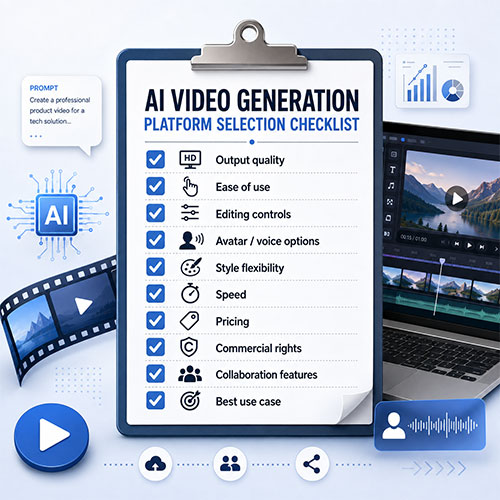
AI Video Generation Platform Selection Checklist
Before choosing an AI video platform, businesses should answer a few practical questions.
Content Goal
What kind of video are you trying to create?
- Social media clip
- Product video
- Explainer video
- Training video
- Ad creative
- Brand concept
- Website video
- Internal communication
- Presentation content
- Creative campaign asset
Workflow Fit
How will your team actually use the platform?
- Prompt-to-video
- Script-to-video
- Article-to-video
- Image-to-video
- Avatar presenter
- Editing and effects
- Content repurposing
- Campaign concepting
- Video localization
- Social media production
Quality Expectations
How polished does the final video need to be?
| Quality Level | Best Fit |
|---|---|
| Fast draft | Pictory, HailuoAI |
| Business video | Synthesia, DeepBrain, Pictory |
| Creative concept | Google Veo, Runway, Midjourney, Kling |
| Social media clip | Pictory, HailuoAI, Kling, Midjourney |
| Professional campaign asset | Runway, Google Veo, Thought Media production support |
| Training or corporate video | Synthesia, DeepBrain |
Business Requirements
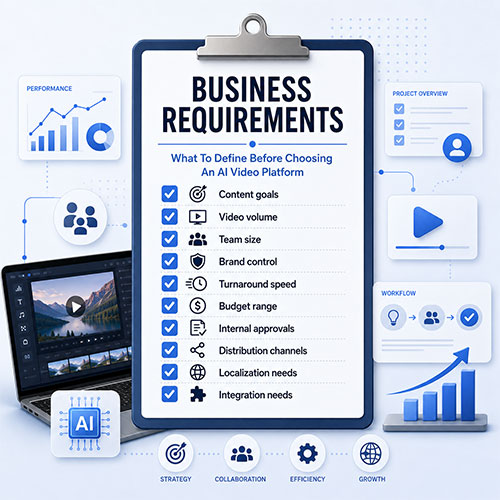 Before using AI-generated video in serious business content, consider:
- Brand consistency
- Voice and tone
- Copyright and licensing
- Platform usage rights
- Human review
- Accessibility
- Captions
- Fact-checking
- Visual accuracy
- Disclosure policies
- Editing quality
- Final export formats
- Distribution strategy
AI can generate video faster.
But business video still needs judgment.
Common Mistakes When Using AI Video Generation Platforms
AI video tools are powerful, but they are not automatic strategy machines. Animation AI helps businesses leverage the best animation tools rapidly.
Common mistakes include:
- Choosing a tool before defining the video goal
- Expecting one prompt to create final production-quality content
- Ignoring brand guidelines
- Using generic visuals
- Publishing videos without human review
- Forgetting captions and accessibility
- Using AI video without checking licensing terms
- Overusing avatars for content that needs emotion or authenticity
- Treating AI clips as finished ads without editing
- Ignoring the landing page or campaign strategy
- Publishing videos that look impressive but do not support a business outcome
The best results usually come from combining AI tools with human strategy, editing, branding, scripting, and campaign planning.
How Businesses Should Use AI Video Generation Strategically
AI video generation should support a larger content strategy.
It should not be used only because the technology is new.
For businesses, AI video can help with:
✓ Faster content production
✓ More frequent social media publishing
✓ Lower-cost creative testing
✓ Better visual support for blog posts
✓ Shorter production cycles
✓ More training and internal communication content
✓ More personalized sales enablement
✓ Stronger product storytelling
✓ Faster campaign concept development
✓ More video variation for ads and landing pages
But the best video still starts with a clear purpose.
A strong AI video workflow should include:
- Define the audience
- Clarify the message
- Choose the right platform
- Write a strong script or prompt
- Generate the first draft
- Review for accuracy and brand fit
- Edit for quality
- Add captions and accessibility
- Export in the correct format
- Publish with a clear campaign strategy
AI makes video faster.
Strategy makes it effective.
Choosing The Right AI Video Generation Platform

Selecting the right AI video generation platform depends on your business, audience, budget, creative needs, and production workflow.
If you need cinematic AI video generation, start with Google Veo, Runway, or Kling.
If you need to turn written content into videos, Pictory is a practical choice.
If you need business training, onboarding, or avatar-led videos, Synthesia and DeepBrain AI Studios are better fits.
If you need visual storytelling and image-to-video creativity, Midjourney can be useful.
If you need fast short-form experiments, HailuoAI may be worth testing.
The best approach is often not one platform.
It is a workflow.
A marketing team may use Pictory for article repurposing, Synthesia for training, Runway for creative edits, Veo for cinematic concepts, and Midjourney for visual exploration.
How Thought Media™ Can Help with AI Video Generation
At Thought Media, we understand that AI video tools are only one part of the content creation process.
Businesses still need strategy, scripting, branding, editing, animation, campaign planning, website integration, SEO, AEO, and digital marketing support.
AI video generation can help companies move faster, but the final result still needs to support a real business objective.
Through Just Animations, an industry leading animation studio, Thought Media™ helps businesses, enterprises, government agencies, NGOs, and public-sector organizations use technology and creativity to build stronger digital experiences.
That can include AI-assisted video workflows, animated explainer videos, product visuals, digital campaigns, website content, social media assets, and broader brand storytelling.
If your organization is exploring AI video generation, the right question is not only which tool to use.
The better question is:
How can AI video support your business goals?
That is where strategy matters.
Final Thoughts
AI video generation platforms are changing how businesses create content.
Google Veo, Pictory, Synthesia, Runway, Kling, HailuoAI, Midjourney, and DeepBrain all serve different needs.
Some are better for cinematic video.
Some are better for marketing.
Some are better for training.
Some are better for social content.
Some are better for creative concept development.
The best platform depends on the job.
For businesses, AI video is most powerful when it is connected to a larger strategy. A good video should not only look impressive. It should explain something, sell something, teach something, promote something, or move the viewer toward action.
AI can help create the video.
But strategy decides whether the video works.
FAQ
What Is The Best AI Video Generation Platform?
The best AI video generation platform depends on your goal. Google Veo is strong for cinematic AI video generation, Pictory is useful for turning articles and scripts into videos, Synthesia is strong for business avatar videos, Runway is strong for creative production, Kling and HailuoAI are useful for realistic short clips, and Midjourney is useful for image-to-video creativity.
Is Google Veo Good For Business Video Generation?
Yes. Google Veo can be useful for business video generation when the goal is cinematic visual concepting, product scenes, campaign visuals, social clips, creative testing, or brand storytelling. It is especially useful for businesses that want original AI-generated visuals rather than simple slideshow-style content.
Is Pictory Good For Marketing Videos?
Yes. Pictory is a strong option for marketing videos because it can help turn scripts, blog posts, articles, and URLs into video content. It is useful for social media, content repurposing, educational videos, and marketing campaigns.
Which AI Video Platform Is Best For Training Videos?
Synthesia and DeepBrain AI Studios are strong options for training videos because they support avatar presenter workflows, scripts, voiceovers, and business-friendly video creation. They are useful for onboarding, internal communication, tutorials, and e-learning.
Which AI Video Platform Is Best For Creative Professionals?
Runway, Google Veo, Kling, and Midjourney are strong choices for creative professionals. These platforms are better suited to visual experimentation, cinematic scenes, image-to-video workflows, concept development, and advertising ideas.
Can AI Video Replace Professional Video Production?
AI video can reduce production time and help create drafts, concepts, social clips, training videos, and marketing assets. However, professional video production is still important for brand campaigns, complex storytelling, live-action shoots, high-trust content, polished editing, and final commercial delivery.
What Should Businesses Check Before Using AI Video?
Businesses should review usage rights, licensing terms, brand consistency, factual accuracy, visual quality, accessibility, captions, editing requirements, and whether the final video supports a real marketing or communication goal.
Is AI Video Good For Social Media?
Yes. AI video can be useful for social media because it allows businesses to create short clips, repurpose written content, test creative ideas, and produce more frequent video assets. Pictory, HailuoAI, Kling, Midjourney, Runway, and Google Veo can all support different types of social media video workflows.
What Is The Difference Between AI Avatar Video And AI Generative Video?
AI avatar video usually uses a virtual presenter to deliver a script, which is useful for training, explainers, and business communication. AI generative video creates scenes, motion, visuals, characters, environments, or cinematic clips from prompts, images, or other inputs.
Can Thought Media Help With AI Video Generation?
Yes. Thought Media helps businesses use AI video generation as part of a larger digital strategy, including video animation, scripting, branding, website content, SEO, AEO, digital marketing, AI development, and campaign planning.