


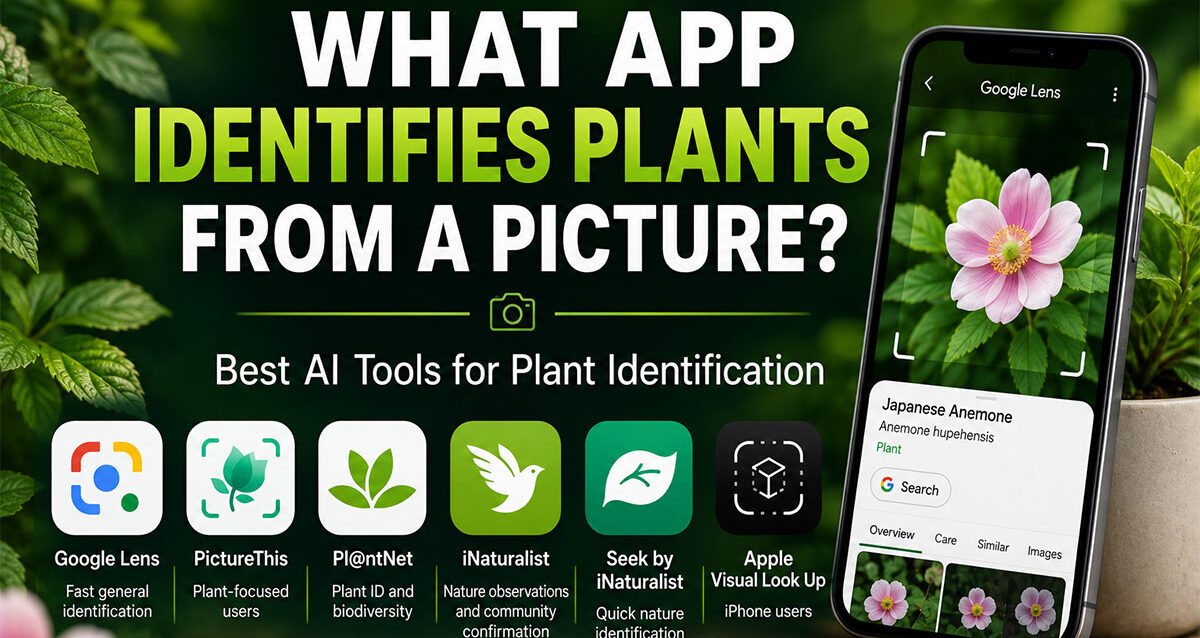
If you’re wondering What App Identifies Plants From a Picture, well Google Lens is one of the easiest apps and AI-powered tools for identifying a plant from a picture. Take a photo of a plant or upload an existing image, and Google Lens can visually analyze the leaves, flowers, shape, color, and other characteristics before returning likely matches and related search results.
For most people asking:
“What app identifies plants from a picture?”
Google Lens is an excellent place to start.
It is widely accessible, works with photographs you already have, and connects visual identification directly with Google Search.
But Google Lens is not the only option.
Other tools such as:
✅ PictureThis
✅ Pl@ntNet
✅ iNaturalist
✅ Seek by iNaturalist
✅ Apple Visual Look Up
can also help identify plants from photographs.
Some tools focus specifically on plants.
Others use broader artificial intelligence and computer vision to recognize many different types of objects.
That distinction is important because plant-identification apps provide an excellent real-world example of how artificial intelligence can turn a simple camera into a visual search interface.
Instead of typing:
“Green plant with six pointed leaves and purple flowers”
you can simply:
take a picture.
The AI analyzes the visual information and attempts to determine what the plant may be.
This article explains which apps identify plants from pictures, how Google Lens works, how AI recognizes plants, how to improve identification accuracy, when results should be verified, and how businesses can build their own AI-powered image-recognition applications.
What App Identifies Plants From A Picture?
Google Lens can identify plants from pictures by using visual search and artificial intelligence to analyze the photograph and find visually similar objects, plants, and information online.
You can generally use it with:
- A new camera photo
- an image saved on your phone
- a photograph found online
- an image displayed inside supported Google experiences
Google specifically lists plants as an example of something users can photograph and search using Google Lens.
For general users, that makes Google Lens one of the most convenient starting points for identifying an unknown plant.
Best Apps That Identify Plants From Pictures
Different plant-identification tools serve different types of users.
| App / Tool | Best For | Main Strength |
|---|---|---|
Google Lens |
Fast general identification | Visual search combined with Google Search |
PictureThis |
Plant-focused users | Dedicated plant-identification experience |
Pl@ntNet |
Plant identification and biodiversity | Plant-focused AI and community data |
iNaturalist |
Nature observations and community confirmation | AI suggestions plus naturalist community |
Seek by iNaturalist |
Quick nature identification | Simple AI-assisted identification |
Apple Visual Look Up |
iPhone users | Identification built into Apple’s ecosystem |
The best app depends on whether you want:
a quick answer
or:
a deeper botanical identification process.
Is Google Lens Good For Identifying Plants?
Yes. Google Lens is particularly useful when you want to quickly identify a plant without installing a highly specialized botanical application.
Its biggest advantage is convenience.
You can photograph something and immediately search based on the image.
Google Lens may help identify:
✅ Flowers
✅ Trees
✅ Houseplants
✅ Leaves
✅ Shrubs
✅ Garden plants
✅ Succulents
✅ Common weeds
✅ Fruits
✅ Vegetables
But the result should be considered an identification suggestion, particularly when plant safety matters.
Artificial intelligence can make mistakes.
How Do You Identify A Plant With Google Lens?
The basic process is simple.
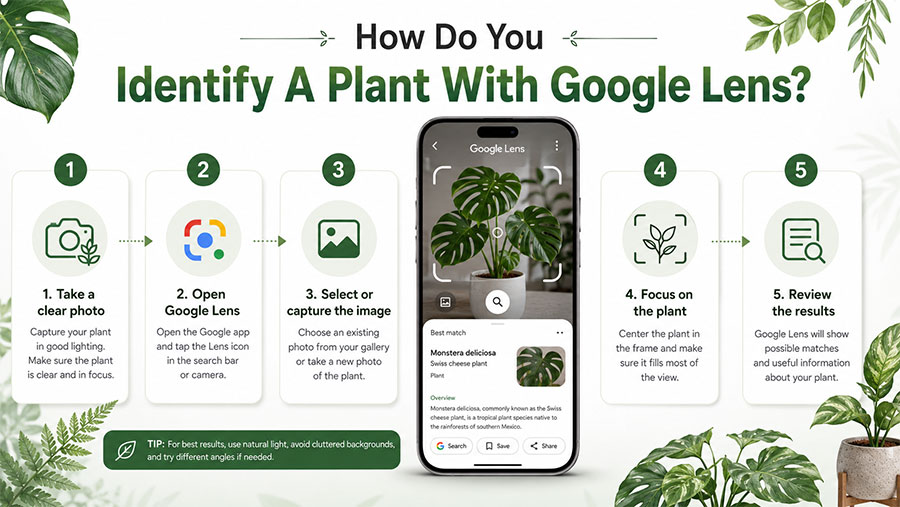
Step 1: Take A Clear Picture
Photograph the plant.
Try to make the plant the main object in the frame.
Step 2: Open Google Lens
Google Lens is available through supported Google applications and image-search experiences.
Step 3: Select Or Capture The Image
Use the photograph you just took or select one from your device.
Step 4: Focus On The Plant
If several objects appear in the image, focus the visual search on the plant itself.
Step 5: Review The Results
Google may return:
- Visually similar plants
- search results
- images
- related information
Step 6: Compare Characteristics
Do not rely only on the first result.
Compare:
✓ Leaf shape
✓ Flower structure
✓ Stem
✓ size
✓ color
✓ growth pattern
✓ location
The more characteristics that match, the stronger the identification becomes.
Can Google Lens Identify A Plant From An Existing Photo?
Yes.
You do not necessarily need to photograph the plant while using the tool.
That is useful when:
- Someone texts you a plant photo.
- You took the picture earlier.
- You find an unidentified plant in your photo library.
- A customer sends your business a photograph.
- You are researching an image online.
Image recognition is valuable because the photograph itself becomes the search query.
Can Google Identify A Plant From A Leaf?
Potentially.
A leaf contains visual characteristics such as:
- Shape
- edge pattern
- veins
- proportions
- texture
- color
AI systems can analyze these characteristics against learned visual patterns.
However, a single leaf may not always provide enough information for an accurate species-level identification.
Many plants have similar leaves.
Whenever possible, provide photographs showing several characteristics.
What Pictures Should You Take To Identify A Plant?
For stronger results, capture more than one type of image.
Whole Plant
Shows:
- Size
- growth habit
- branching
- overall structure
Leaf
Shows:
- Shape
- veins
- edges
- texture
Flower
Flowers can contain highly distinctive identifying features.
Stem Or Bark
Useful for:
- Trees
- shrubs
- woody plants
Fruit Or Seed
These features can further narrow identification.
A single photograph may be enough for an obvious species.
More difficult plants can require several views.
How Does AI Identify A Plant From A Picture?
Plant-identification applications commonly rely on a field of artificial intelligence known as computer vision.
Computer vision allows software to analyze visual information.
A simplified process looks like:
Photo → Image Processing → Visual Features → AI Model → Possible Classification
The AI may analyze patterns associated with:
- Leaves
- flowers
- stems
- shape
- texture
- color
- proportions
The system compares those patterns with information learned from many previous images.
It then estimates which known categories most closely match the photograph.
What Is Computer Vision?
Computer vision is an area of artificial intelligence that enables computers to analyze and interpret images and video.
Plant identification is only one application.
Computer vision can also be used for:
✅ Product recognition
✅ Manufacturing inspection
✅ Medical imaging
✅ Retail inventory
✅ Document scanning
✅ Vehicle detection
✅ Security systems
✅ Agriculture
✅ Object recognition
✅ Visual search
This is why the technology behind a plant-identification app can also have significant business applications.
Thought Media’s artificial intelligence development services include intelligent applications that can combine machine learning, data analysis, automation, websites, applications, IoT, and other AI-powered capabilities.
How Does Machine Learning Help Identify Plants?
Machine learning enables a system to learn visual patterns from data.
Imagine an AI model receives many accurately labeled photographs of:
sunflowers.
Over time, the model can learn visual patterns that frequently occur in sunflower images.
When it receives a new photograph, it estimates whether the visual information resembles what it previously learned.
The same general principle can be applied across thousands of plant species.
Thought Media’s machine learning development services apply similar data-driven principles to business applications including prediction, automation, analytics, and intelligent systems.
Does The AI Search The Internet For The Exact Picture?
Not necessarily.
There are several possible approaches to image identification.
Image Classification
The system categorizes what it sees.
Example:
“This appears to be a sunflower.”
Visual Similarity
The system looks for visually similar images.
Object Detection
The system identifies objects within a larger scene.
Example:
Plant
Flowerpot
Garden tool
Visual Search
The image becomes an input used to retrieve relevant information.
Google Lens is particularly useful because visual recognition can connect directly with search.
Google Lens vs Dedicated Plant Identification Apps
Google Lens is broad.
Dedicated plant apps are specialized.
| Feature | Google Lens | Dedicated Plant App |
|---|---|---|
| Plant Identification | ✅ | ✅ |
| General Object Recognition | ✅ | Usually limited |
| Connected To Broad Web Search | ✅ | Varies |
| Plant-Specific Interface | Limited | ✅ |
| Botanical Focus | General | Stronger |
| Quick Visual Search | ✅ Excellent | ✅ |
| Specialized Plant Features | Limited | Often stronger |
Use Google Lens when:
You want a quick general identification.
Consider a dedicated plant app when:
You want a plant-focused experience.
What Is PictureThis?
PictureThis is a plant-identification application designed specifically around identifying and learning about plants.
Users can photograph a plant and receive suggested identification information.
A dedicated platform can provide a more focused experience than a general-purpose image-search tool.
That makes it attractive for:
- Gardeners
- homeowners
- plant enthusiasts
- landscaping users
Google Lens remains a strong starting point because it does not require the user to begin with a specialized botanical workflow.
What Is Pl@ntNet?
Pl@ntNet is a plant-identification platform built around biodiversity and citizen science.
Users can provide photographs and receive possible plant identifications.
Its plant-specific approach makes it useful when the objective is not merely recognizing an object but understanding the likely species.
Pl@ntNet also demonstrates an important AI principle:
Human data helps improve machine intelligence.
Image-recognition systems become more useful when they have access to large collections of accurately identified examples.
What Is iNaturalist?
iNaturalist combines technology with a community of people interested in nature and biodiversity.
A user can submit an observation and receive identification suggestions.
Other users can also contribute to the identification process.
That creates a hybrid model:
AI-assisted recognition + human knowledge.
This is an important model for artificial intelligence generally.
AI does not always need to replace human expertise.
Sometimes the strongest system uses AI to narrow the possibilities and humans to verify the result.
What Is Seek By iNaturalist?
Seek is designed to provide a simpler nature-identification experience.
Users can explore and identify organisms using AI-assisted recognition.
It is particularly useful for people who want:
✓ Immediate identification
✓ Nature exploration
✓ A simple mobile experience
✓ More than plant identification alone
Because Seek can identify types of organisms beyond plants, it sits somewhere between a specialized plant app and a broad visual-search application.
Can An iPhone Identify Plants Without A Separate Plant App?
Modern Apple devices may support Visual Look Up, which can identify or provide information about certain objects appearing in photographs.
Depending on the device, operating system, region, and supported content, this can include types of plants.
This makes built-in visual recognition another convenient option for some iPhone users.
For businesses developing richer custom mobile functionality, Thought Media provides iOS application development for native apps that can incorporate modern APIs, AI-powered functionality, and device capabilities.
What Is The Best Free App To Identify Plants?
For someone who wants a fast, convenient option without beginning with a specialized plant-subscription service, Google Lens is an excellent first choice.
Why?
✅ Easy to access
✅ Works with photographs
✅ Handles more than plants
✅ Connects identification with search
✅ Useful for quick comparisons
Pl@ntNet and other nature-identification tools can also be useful depending on the type of user and the features required.
The best approach for a difficult identification may involve more than one tool.
Should You Use More Than One Plant Identification App?
Yes, especially when accuracy matters.
For example:
Google Lens suggests Plant A.
A dedicated plant-identification app suggests:
Plant A.
An experienced naturalist confirms:
Plant A.
Confidence is now stronger than relying on one automated result.
If two platforms return completely different answers, additional investigation is appropriate.
How Accurate Are Apps That Identify Plants?
Accuracy varies.
Factors include:
- Image quality
- species
- plant maturity
- visible features
- lighting
- background
- camera angle
- geographic context
- training data
- AI model
Some species have visually distinctive flowers.
Others may look extremely similar.
An app should generally be treated as an identification assistant rather than an infallible botanical authority.
Why Does A Plant Identification App Get The Wrong Answer?
Several problems can cause errors.
Poor Image Quality
Blurry photographs remove useful visual details.
Similar Species
Different plants may have nearly identical leaves.
No Flowers
Some plants are easier to identify when flowering.
Busy Background
The AI may focus on the wrong object.
Unusual Plant Condition
Disease, damage, or unusual growth can change appearance.
Limited Training Examples
The AI may not have enough high-quality examples of a rare species.
Wrong Geographic Context
A visual match may look correct but be unlikely for the region.
AI recognition always involves probability.
How Can You Improve Plant Identification Accuracy?
Use better photographs.
Use Natural Light
Avoid extremely dark images.
Keep The Plant In Focus
Blur removes visual information.
Isolate The Subject
Avoid clutter where possible.
Capture Multiple Angles
Show:
- Leaves
- flowers
- stem
- full plant
Include Scale
Size can matter.
Compare Multiple Suggestions
Do not automatically choose the first result.
Consider Location
Ask:
Does this plant normally grow here?
Can AI Identify Poisonous Plants?
AI may suggest the identity of a plant that is poisonous.
That does not mean you should rely on an app to determine whether a plant is safe to eat or touch.
Errors can have serious consequences.
Do not consume:
- Wild plants
- berries
- mushrooms
- seeds
based solely on an AI identification.
Use appropriate expert guidance when safety matters.
Can An App Identify Plant Diseases From A Picture?
Some specialized plant applications can analyze visible symptoms such as:
- Spots
- discoloration
- damaged leaves
- unusual growth
However, visual symptoms can have several possible causes.
For example:
Yellow leaves might result from:
- Watering
- nutrients
- disease
- pests
- lighting
- root problems
Image recognition may help narrow possibilities, but it should not automatically be treated as a definitive diagnosis.
Plant Identification vs Plant Disease Identification
These are different AI problems.
Plant Identification
Question:
“What species is this?”
Disease Identification
Question:
“What is happening to this plant?”
The second can be more complicated because multiple problems may produce similar symptoms.
Why Google Lens Is More Than A Plant Identification App
Google Lens illustrates a larger shift in how people interact with computers.
Traditional search begins with:
Text.
Visual search can begin with:
An image.
Instead of describing what you see, you show the computer.
That opens much broader applications.
What Else Can Visual AI Identify?
Computer-vision systems can potentially recognize:
✅ Products
✅ Vehicles
✅ Buildings
✅ Animals
✅ Tools
✅ Machinery
✅ Clothing
✅ Food
✅ Documents
✅ Equipment
✅ Logos
✅ Components
The exact capability depends on the application and AI model.
How Can Businesses Use The Same Technology?
The basic idea behind plant identification can be adapted to business problems.
Imagine a customer photographs:
A replacement machine component.
Instead of searching through a 500-page catalog, an AI-powered application identifies likely parts.
Or:
A technician photographs damaged equipment.
The app retrieves:
- Product model
- technical manual
- maintenance history
- recommended next steps
This is where simple image recognition becomes a business system.
Product Identification Apps
Retailers and manufacturers can build visual-search applications where customers photograph an item.
The system could return:
- Product name
- SKU
- compatible accessories
- replacement components
- availability
- instructions
This can reduce friction when customers do not know what something is called.
AI Image Recognition For Manufacturing
Manufacturing can use computer vision for:
✓ Defect detection
✓ Component identification
✓ Quality control
✓ Machine monitoring
✓ Safety analysis
✓ Inventory
A camera can become a data-collection tool.
The AI interprets what the camera sees.
AI Image Recognition For Retail
Retail applications can include:
- Visual product search
- shelf monitoring
- inventory analysis
- product recommendations
A consumer could photograph an item and ask:
“Do you sell something like this?”
The application can potentially return visually similar products.
AI Image Recognition For Agriculture
Agricultural applications may include:
- Plant classification
- crop monitoring
- disease indicators
- weed identification
- visual field analysis
The same fundamental AI capability used by consumers can scale into commercial systems.
Can A Business Build Its Own Plant Identification App?
Yes.
A custom application could potentially combine:
- Camera
- Computer vision
- AI model
- Plant database
- Search
- Location data
- User interface
The project would need to determine:
- Which plants should be recognized?
- How accurate must identification be?
- What dataset is available?
- Does it work online or offline?
- Should users submit several images?
- Does the app provide confidence scores?
- Is human validation required?
The business requirement determines the architecture.
What Would A Custom AI Identification App Need?
A visual-identification application may include several components.
Mobile Application
Provides:
- Camera
- upload
- user interface
- identification results
Computer Vision
Analyzes the image.
Machine Learning
Classifies the visual information.
Database
Stores:
- Species
- products
- objects
- metadata
API
Connects the mobile application with backend systems.
Search
Retrieves detailed information.
AI Assistant
Could allow follow-up questions.
Example:
User: “What plant is this?”
AI: “The image most closely resembles a peace lily.”
User: “How much sunlight does it need?”
Now visual identification becomes conversational.
Could An AI Agent Use Image Recognition?
Yes.
Computer vision determines:
“What am I seeing?”
An AI agent can then decide:
“What should I do with that information?”
Example:
- Worker photographs damaged equipment.
- Computer vision identifies the model.
- AI retrieves service history.
- Agent finds the correct manual.
- Agent generates troubleshooting steps.
- System opens a maintenance ticket.
That is far more powerful than image recognition alone.
Thought Media’s AI agent development can combine intelligent decision-making with applications, data, tools, and automated workflows.
How Much Does It Cost To Build An AI Image Recognition App?
Costs vary widely based on scope.
A conceptual planning framework might look like:
| AI Visual Application | Approximate Budget (USD) |
|---|---|
| Basic Image Recognition Prototype | $15,000–$40,000+ |
| Focused AI Mobile App | $30,000–$75,000+ |
| Custom Visual Search Application | $50,000–$125,000+ |
| Advanced Computer Vision Platform | $75,000–$250,000+ |
| Enterprise Visual AI System | $150,000–$500,000+ |
These are planning ranges rather than fixed prices.
The cost depends on:
- App development
- AI model
- training data
- integrations
- number of objects
- accuracy requirements
- user interface
- cloud infrastructure
- testing
- security
What Makes An Image Recognition App Expensive?
Dataset
A highly specialized AI may require substantial labeled visual data.
Number Of Categories
Recognizing:
10 objects
is different from recognizing:
100,000 objects.
Accuracy
Higher reliability can require more training, evaluation, and validation.
Mobile Development
Supporting iOS and Android increases project scope.
Thought Media provides Android application development for mobile applications incorporating APIs, AI functionality, camera capabilities, and intelligent automation.
Offline Recognition
Running AI directly on a device creates different technical requirements than cloud processing.
Integrations
A product-recognition application might connect with:
- Inventory
- ecommerce
- CRM
- product database
- customer account
Can A Plant Identification App Work Offline?
Potentially.
An offline application can store a machine-learning model on the device.
Advantages may include:
✅ No Internet required
✅ Faster local response
✅ Greater privacy in some workflows
But the model needs to fit within device limitations.
Cloud processing can provide access to:
- Larger models
- frequently updated data
- more compute
The appropriate architecture depends on the use case.
Android vs iPhone For AI Identification Apps
Both platforms can support AI-powered image-recognition applications.
Android
Offers broad device availability and integration with Google’s ecosystem.
iOS
Provides Apple’s native hardware, camera, and machine-learning frameworks.
Businesses may also choose a cross-platform development approach.
The correct choice depends on:
- Audience
- budget
- performance
- device features
- deployment strategy
Is AI Image Recognition The Same As Generative AI?
No.
They can work together, but they solve different problems.
Computer Vision
Analyzes visual information.
“This image contains a rose.”
Generative AI
Creates or generates information.
“Here is a care guide for roses.”
Combined:
Computer vision identifies the rose → generative AI explains how to care for it.
Thought Media’s generative AI development supports AI applications that generate and interpret content across business workflows and digital platforms.
The Future Of Apps That Identify Objects From Pictures
Visual interfaces are likely to become increasingly common.
Instead of requiring users to know:
What is this called?
software can begin with:
Show me.
A user might:
- photograph a plant
- photograph a product
- photograph a machine part
- photograph a document
- photograph a damaged component
The application interprets the image and provides the next action.
The camera becomes more than a camera.
It becomes:
an input for artificial intelligence.
Why Work With Thought Media™ For AI App Development?
Thought Media™ develops artificial intelligence solutions alongside mobile applications, web applications, machine learning, AI agents, digital platforms, managed hosting, IT services, and other technology solutions.
An AI-powered image-recognition application may require:
✅ Mobile app development
✅ Machine learning
✅ Computer vision
✅ APIs
✅ Databases
✅ Cloud infrastructure
✅ AI agents
✅ Generative AI
✅ UI/UX
✅ Ongoing development
Thought Media™ has worked with businesses and organizations since 2009 and develops custom technology around practical business use cases.
A plant-identification application is a useful consumer example.
But the same underlying technology can help businesses identify:
Products.
Components.
Equipment.
Documents.
Defects.
Inventory.
Visual patterns.
The real opportunity is not simply:
“Can AI recognize this picture?”
It is:
“What useful business action should happen after AI recognizes the picture?”
Final Thoughts: What App Identifies Plants From A Picture?
If you want a straightforward answer:
Google Lens is one of the easiest AI-powered tools for identifying a plant from a picture.
Take or upload a photograph, let Google Lens analyze the image, and review the likely visual matches and related information.
Other useful options include:
✓ PictureThis
✓ Pl@ntNet
✓ iNaturalist
✓ Seek
✓ Apple Visual Look Up
For more difficult plants, using multiple sources and comparing several plant characteristics can improve confidence.
And remember:
AI identification is a suggestion, not a guarantee.
This is especially important when determining whether a wild plant is:
Edible.
Poisonous.
Medicinal.
Safe for animals.
Beyond gardening, plant identification demonstrates something much larger.
Modern artificial intelligence can transform photographs into searchable information.
That same capability can power:
Visual search.
Product identification.
Manufacturing inspection.
Agricultural technology.
Retail applications.
Intelligent mobile apps.
Google Lens makes the technology accessible to almost anyone.
Custom AI development can take the same concept and adapt it to specific business problems.
Frequently Asked Questions
What app identifies plants from a picture?
Google Lens is one of the easiest tools for identifying plants from pictures. Take or upload a photo, and Google Lens can analyze the visual information and return likely matches, similar images, and relevant search results. Dedicated alternatives include PictureThis, Pl@ntNet, iNaturalist, and Seek.
Can Google Lens identify a plant from a photo?
Yes. Google Lens can use a photograph of a plant as a visual search query and return information and visually similar results. Clear pictures showing distinctive leaves, flowers, stems, or other features generally provide better information for identification.
What is the best free plant identification app?
Google Lens is an excellent general-purpose starting point because it provides visual search without requiring a specialized plant-identification workflow. Pl@ntNet and other nature applications can also be useful, particularly when users want a more plant-focused experience.
How does AI identify plants from pictures?
AI plant-identification applications commonly use computer vision and machine learning to analyze visual characteristics such as leaf shape, flowers, texture, color, and overall structure. The system compares those patterns with information it has learned from previously identified images and suggests likely matches.
Can you build a custom app that identifies objects from pictures?
Yes. Businesses can develop custom visual-recognition applications for plants, products, machinery, components, inventory, documents, and other objects. These applications can combine computer vision, machine learning, mobile app development, databases, search, APIs, and AI agents to turn an image into useful business information or automated actions.